Affiliate Disclosure: This article contains affiliate links. If you sign up or make a purchase through these links, I may earn a commission at no additional cost to you. I aim to recommend tools that offer practical value and can help readers make more informed decisions.
Introduction: Are You Creating Facebook Content or Just Guessing?
You know you need to post consistently on Facebook. You have a business to promote, an audience to engage and services or products to sell. But there’s one problem: deciding what to post is becoming harder than actually creating the content.
You open Facebook looking for inspiration. You visit a competitor’s Page, scroll through a few posts, check what other creators are publishing and perhaps save a screenshot of something interesting.
Before long, you’ve spent an hour browsing, but you still don’t have a clear content plan.
Even worse, you might have noticed that some businesses consistently receive hundreds of reactions, comments and shares, while your carefully designed posts barely attract attention.
What are they doing differently?
Are they using better hooks? Are they discussing topics their audiences care about? Are they using a particular content format? Or have they simply figured out how to communicate their message more effectively?
The answers are often sitting in the content people are already publishing. The challenge is knowing how to research that content, identify useful patterns and turn what you discover into ideas for your own business.
Instead of relying entirely on guesswork, you can use Facebook content research tools to collect and organize information about other public profiles, Pages and Groups.
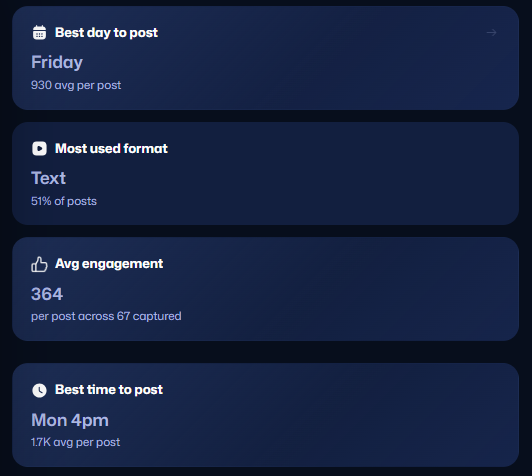
One tool worth exploring is PostSnag, a Chrome extension and dashboard designed to capture Facebook posts and help users analyze their performance.
In this guide, we’ll look at why Facebook content research matters, how PostSnag works, practical ways to use it, how to combine it with AI and whether its features justify the cost.
Explore PostSnag and try the free plan here.
1. Why Researching Successful Facebook Content Matters
Posting consistently is important, but consistency alone does not guarantee results.
You can publish five posts every week and still struggle to attract the right audience. You can spend hours designing graphics, writing captions and creating videos without knowing whether your topics are relevant to the people you want to reach.
This is where content research becomes valuable.
Rather than creating content based only on what you think people want to see, you can study existing conversations and identify patterns in the posts that attract attention.
Here are six reasons to make content research part of your Facebook marketing strategy.
Identify topics your audience is interested in
Suppose you’re a business coach who helps people start online businesses.
You could create posts about entrepreneurship, marketing, digital products and productivity. But which topics are people actually responding to?
By studying successful creators in the same niche, you may discover that posts about finding your first customer, choosing a profitable digital product or overcoming inconsistent sales generate more discussion than general motivational messages.
That information gives you a starting point for your own content.
Understand which content formats attract engagement
Not every audience responds to the same format.
Some people enjoy short text posts, while others engage more with educational graphics, videos, Reels, questions or personal stories.
Researching posts across different formats can help you identify which approaches are worth testing in your own content strategy.
Discover better ways to write hooks
The first few words of a social media post can determine whether someone continues reading or scrolls past.
Consider the difference between these two openings:
- “Here are some marketing tips for small businesses.”
- “Your business doesn’t need more posts. It needs a clearer reason for people to buy.”
Both introduce marketing-related information, but the second creates curiosity and gives the reader a reason to continue.
Studying effective posts can help you understand different approaches to opening lines, storytelling and calls to action.
Understand what competitors are doing
Research isn’t about copying a competitor’s content.
It’s about understanding the topics they cover, how they communicate their offers, what questions they address and which posts appear to generate stronger responses.
This can reveal opportunities to approach a subject from a different angle or provide information that other businesses are overlooking.
Find questions and problems worth addressing
Facebook Groups are particularly useful for understanding what people are discussing.
A recurring question, complaint or challenge can become an educational post, a tutorial, a video or even a product idea.
For example, if people in a business group frequently ask how to create a simple payment link, that could become a practical tutorial for your audience.
Make your content planning more intentional
When you have a collection of researched topics and examples, you don’t have to start every content planning session with a blank page.
You can organize ideas into categories, identify recurring themes and build a content calendar around topics that are relevant to your audience.
The goal isn’t to eliminate creativity. It’s to give your creativity better information to work with.
An important distinction: Researching successful content doesn’t mean copying captions, graphics or videos. It means identifying what makes a post interesting and using those insights to create something original and relevant to your audience.
2. What Is PostSnag and How Does It Work?
PostSnag is a Facebook content research tool that combines a Chrome browser extension with an online dashboard.
Its main purpose is to help users capture posts from Facebook profiles, Pages and Groups, then organize the collected information so they can study content performance more efficiently.
Ordinarily, researching a competitor might involve taking screenshots, saving links, writing down engagement figures and manually organizing everything in a spreadsheet.
PostSnag provides a more structured way of doing that.
It has two main components.
The Chrome extension
The extension works while you’re browsing Facebook on a supported desktop browser.
When you visit a public profile, Page or Group and scroll through its content, PostSnag captures the posts that load in your browser.
Depending on the post, the collected information includes:
- Post captions and text.
- Post type, such as text, photos, videos, Reels, albums and links.
- Reactions and reaction breakdowns.
- Comments and shares.
- Video and Reel views where available.
- Publication dates and times.
- Media associated with the posts.
- Links to the original posts.
You can view the capture information in the extension panel and send the collected material to your PostSnag dashboard.
The PostSnag dashboard
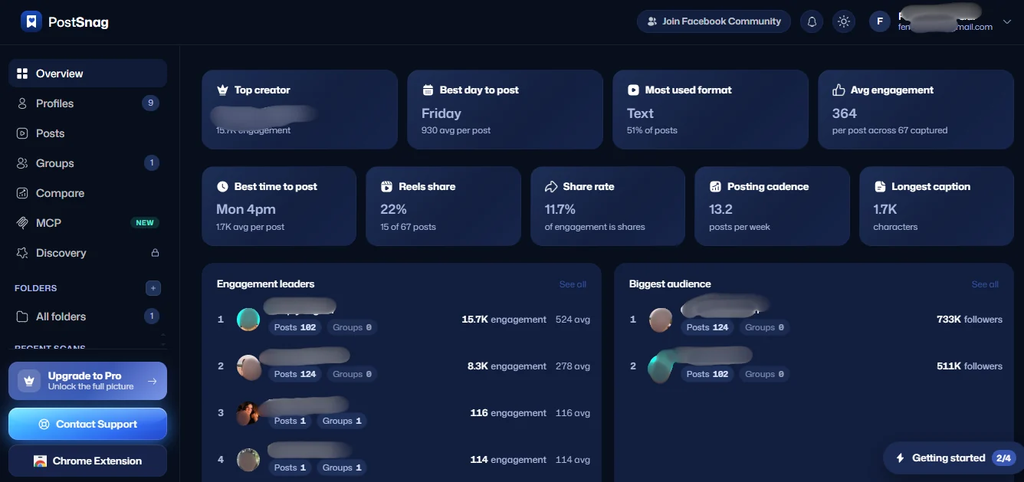
The dashboard is where the collected information becomes useful for research.
Instead of having multiple screenshots and saved links scattered across different folders, you can organize your captured content in one place.
Some of the key dashboard features include:
Overview: Provides a general view of your captured content.
Profiles: Keeps the posts and analytics associated with individual creators, profiles and Pages organized.
Posts: Brings captured posts together so you can search, filter, sort and review them.
Groups: Organizes information collected from Facebook Groups.
Compare: Allows you to compare up to three profiles side by side.
Bookmarks and Folders: Help you save useful posts and organize research by topic, niche or client.
Discovery: Helps identify caption and hook patterns across the creators you track. This feature is available on paid plans.
The idea is simple: instead of relying on memory when researching Facebook content, you have an organized collection of posts and engagement information to refer to.
You can read more about the product on the official PostSnag feature guide.
3. How to Use PostSnag for Facebook Content Research
You don’t need an elaborate research process to get started. The basic workflow involves installing the extension, choosing the profiles you want to study, capturing their content and reviewing the results.
Here is how to approach it.
Step 1: Identify the Facebook profiles you want to research
Start by identifying three to five creators, businesses or competitors in your niche.
Choose profiles that:
- Target an audience similar to yours.
- Offer related products or services.
- Publish content consistently.
- Discuss topics relevant to your business.
- Have an active Facebook presence.
For example, a freelance social media manager could research other social media consultants, marketing agencies and business coaches.
A baker could study local bakeries, cake designers and food creators.
A business coach could research people who regularly publish content about entrepreneurship, business growth and online marketing.
You don’t have to limit your research to direct competitors. Sometimes, businesses serving a similar audience in a different way offer useful content inspiration.
Step 2: Install the PostSnag Chrome extension
Visit the PostSnag website and follow the instructions to get started.
The extension is available through the Chrome Web Store. PostSnag also supports other Chromium-based browsers, including Microsoft Edge and Brave.
After installing it, pin the extension to your browser toolbar so it’s easier to access.
You’ll need to be logged into your Facebook account in the browser you are using.
Step 3: Visit a Facebook profile, Page or Group
Open the profile or Page you want to research.
As you scroll through the content, PostSnag captures the posts that load on your screen.
You can review the captured information in the extension panel, then use its Export to Dashboard function to save your research.
For the most complete results, scroll through the content you want to study rather than assuming that a single visit automatically retrieves every historical post.
Step 4: Review the captured posts in your dashboard
Once your content is in the dashboard, you can start examining the information.
Look for posts that stand out because of their visible engagement.
Pay attention to:
- Topics that repeatedly attract reactions.
- Posts receiving a high number of comments.
- Content formats that appear frequently among engaging posts.
- Captions that generate discussion.
- Videos and Reels receiving notable view counts.
- Questions or opinions that encourage people to respond.
Don’t just look at the post with the highest number of likes. Consider the type of audience, the account’s size, the subject being discussed and the date the post was published.
A post with 500 comments might be successful because it asks a controversial question, while another post with fewer comments might generate more meaningful conversations from potential customers.
The context matters.
Step 5: Compare profiles
If you are researching multiple competitors, PostSnag’s Compare feature allows you to put up to three profiles side by side.
This can help you identify similarities and differences in their content strategies.
For example:
- Does one competitor publish more educational content?
- Are certain topics appearing across all three profiles?
- Does one creator receive more engagement on video posts?
- Are there common themes among their most popular posts?
Comparing several profiles helps prevent you from basing your entire content strategy on the approach of just one creator.
Step 6: Turn your research into a content plan
Research is only useful when you do something with it.
Create a document or spreadsheet containing the information you want to act on.
You could organize it using categories such as:
| Research category | What to record |
|---|---|
| Popular topics | Subjects receiving repeated engagement |
| Audience problems | Questions, frustrations and challenges |
| Hooks | Effective approaches to opening lines |
| Content formats | Text, images, videos and Reels |
| Conversations | Questions and discussion themes |
| Content opportunities | Subjects you can approach differently |
You now have a starting point for creating content based on research rather than guesswork.
Try PostSnag for your own Facebook research: Explore the free plan.
4. Five Practical Ways to Use PostSnag in Your Business
Understanding how a tool works is one thing. Knowing how to apply it to real business activities is another.
Here are five practical ways different people can use PostSnag.
1. Research competitors and understand their content strategies
Competitor research is useful whether you’re running a small business, offering professional services or managing social media accounts for clients.
Suppose you manage a Facebook Page for a business coach.
You could capture the posts from three established coaches in the same niche and examine their content.
Look for common themes.
Perhaps one creator frequently publishes educational posts, another uses personal stories, while the third focuses on client questions and business lessons.
You may also discover that posts addressing specific audience frustrations receive more comments than general promotional messages.
You can use those observations to make recommendations for your client.
Instead of simply telling them to post more frequently, you can suggest specific topics, formats and messaging approaches worth testing.
2. Build a library of Facebook content ideas
Coming up with fresh ideas consistently can be one of the most difficult parts of content creation.
PostSnag can help you build a research library containing posts from multiple creators and Pages.
For example, a skincare business could organize research into folders such as:
- Common skincare questions.
- Product education.
- Customer concerns.
- Ingredient explanations.
- Frequently discussed misconceptions.
- Seasonal skincare topics.
When it’s time to create content, the business has a collection of researched topics to work from.
This doesn’t mean reproducing another creator’s content. It’s about identifying audience interests and creating original explanations, examples and solutions.
3. Research Facebook Groups for content opportunities
Facebook Groups contain discussions around specific interests, industries and challenges.
For service providers and entrepreneurs, these conversations can provide useful insight into what potential customers are struggling with.
Suppose you offer website design services.
You might find repeated discussions about:
- How to choose a website platform.
- How to connect a domain.
- How to set up a booking form.
- How to accept online payments.
- Why a website isn’t generating enquiries.
These are not just questions. They are potential content topics.
You could turn them into short tutorials, longer educational posts, checklists or videos.
With PostSnag, you can capture and organize accessible Group content rather than relying on manually saving individual examples.
Always respect Group membership requirements, privacy expectations and the rights of the people who contribute to those conversations.
4. Study hooks and opening lines
A good topic can still receive little engagement when the opening doesn’t give people a reason to read further.
Studying engaging posts can help you identify different hook approaches.
For example:
Problem-focused hook:
“You’re posting consistently, but people still aren’t asking about your services. Here’s what might be missing.”
Curiosity-driven hook:
“Most small businesses overlook this when setting up their Facebook Pages.”
Contrarian hook:
“More content isn’t always the answer to poor social media engagement.”
Question-based hook:
“What would you change about your business if you could attract customers without constantly chasing them?”
Notice that these hooks don’t all communicate in the same way. They appeal to different reader motivations.
By observing recurring patterns in your research, you can build a collection of approaches to test in your own writing.
PostSnag’s Discovery feature is particularly relevant here because it helps identify caption and hook patterns among the creators you track.
5. Improve social media management and client reporting
If you’re a freelance social media manager or run a marketing agency, competitor research can become part of your service.
Before developing a content strategy for a new client, you could research relevant competitors and examine their public posts.
Your findings could support recommendations about:
- Content themes to explore.
- Formats worth testing.
- Topics generating conversations.
- Opportunities to differentiate the brand.
- Areas where competitors are not providing enough useful information.
You can also save research in folders to keep different client projects organized.
This makes it easier to explain why you’re recommending a particular content direction.
Instead of relying entirely on personal opinions, you can support your suggestions with examples from the market.
5. How to Combine PostSnag with AI to Generate Better Content Ideas
This is one of the more interesting opportunities for people who already use AI tools in their content creation process.
AI tools such as ChatGPT and Claude can help with brainstorming, writing, categorizing information and analyzing patterns.
However, the quality of the output depends partly on the information you provide.
A vague prompt such as “Give me 30 Facebook content ideas” may produce a generic list that could apply to almost any business.
What if you could give AI actual examples of content being published in your niche?
That’s where combining PostSnag with AI becomes useful.
How the process works
PostSnag supports AI-ready exports, allowing users to download captured data and media for further analysis.
Its paid plans also include PostSnag MCP, which can connect your captured library with compatible AI tools, including ChatGPT, Claude, Grok and Perplexity.
This means you can work with your collected Facebook research instead of manually copying individual posts into an AI conversation.
For example, you could:
- Capture posts from several creators in your niche.
- Organize the collected posts in your PostSnag dashboard.
- Export the relevant research or connect a supported AI tool through PostSnag MCP.
- Ask the AI to identify recurring topics, audience problems, hooks and content patterns.
- Use the findings to develop original content ideas.
An example AI prompt for Facebook content research
Once you have relevant research available to your AI tool, you can use a prompt like this:
Prompt:
“Act as an experienced social media content strategist.
Analyze the Facebook posts in the research provided.
I want you to identify:
- The five most common topics being discussed.
- The audience problems and questions addressed by these posts.
- The recurring hook styles and opening lines.
- The types of posts that appear to attract the strongest visible engagement.
- Any content gaps or topics that are receiving little attention but could offer opportunities for a business.
Based on your findings, suggest 20 original Facebook post ideas for a small business in this niche.
For each idea, provide:
- A suggested hook.
- The main message.
- The content format.
- A suitable call to action.
Do not copy the original posts. Use the research to identify patterns and develop fresh ideas that communicate value to a different audience.”
This approach gives you a research-led starting point rather than asking AI to invent ideas without context.
One important point: AI-generated recommendations are only as useful as the research and instructions behind them. You should still review the findings, check the context and use your understanding of your audience before publishing anything.
6. PostSnag Pricing: Which Plan Should You Choose?
You may be wondering whether PostSnag is free or whether you need a paid subscription to access its features.
PostSnag currently offers three plans: Free, Pro and Lifetime.
Here is a breakdown based on its published pricing and plan information.
| Feature | Free | Pro | Lifetime |
|---|---|---|---|
| Price | $0 | $19/month | $139 once |
| Profile scans | 3/week | Unlimited | Unlimited |
| Group scans | 2/week | Unlimited | Unlimited |
| Posts per scan | 30-post preview | Full capture | Full capture |
| Dashboard | Limited by plan | Full | Full |
| Discovery | No | Yes | Yes |
| AI integrations (MCP) | No | Yes | Yes |
| AI-ready full exports | Limited | Yes | Yes |
| Renewal | None | Monthly | None |
Both paid plans include a 14-day money-back guarantee on the first payment. Check the official pricing page for the latest terms and features.
Free plan: For trying the tool
The free plan costs nothing and does not require a credit card.
It includes three profile scans and two Facebook Group scans in a rolling seven-day period. Each scan provides a 30-post preview.
It’s a useful starting point if you want to understand how the extension works, experiment with the dashboard and carry out occasional research.
The free version also provides access to several dashboard areas, although Discovery and PostSnag MCP are reserved for paid users.
Pro plan: For regular Facebook research
At $19 per month, Pro removes the weekly scanning limits and unlocks full captured post histories.
It also includes:
- The Discovery feature.
- Full AI-ready exports.
- PostSnag MCP integrations.
- Saved scans.
- Priority email support.
This plan makes sense for people who regularly research competitors, manage multiple social media accounts or need to build content strategies using Facebook data.
Lifetime plan: For long-term users
The Lifetime plan costs $139 as a one-time payment.
It includes the Pro features without a recurring monthly subscription.
For someone who knows they will regularly use PostSnag, this may be worth considering.
However, don’t choose a lifetime plan simply because it sounds like a bargain. Consider how frequently you will use the tool and whether the features justify the upfront payment.
You can start with the free plan, explore the workflow and upgrade when your research needs grow.
Check the latest PostSnag plans and try the free version.
7. What Are the Advantages and Limitations of PostSnag?
No tool is suitable for everyone.
Before choosing a software product, it’s worth understanding both what it does well and where its limitations are.
Advantages
1. Organizes Facebook research
Instead of maintaining multiple screenshots, links and spreadsheets, you can collect posts and their associated information in a dedicated dashboard.
2. Helps with competitor research
You can research public profiles and Pages beyond the accounts you personally manage, giving you a better understanding of what other creators in your industry are publishing.
3. Provides post-level engagement information
Reactions, comments, shares and available video views make it easier to examine the visible response to individual posts.
4. Supports profile comparisons
The ability to compare up to three profiles can help identify differences in their content approaches.
5. Integrates with AI workflows
AI-ready exports and MCP integrations offer additional opportunities to analyze the research you’ve collected.
6. Has a free starting option
You can try the extension and dashboard without immediately committing to a subscription.
Limitations to consider
1. It is currently designed for Facebook only.
PostSnag does not currently capture posts from Instagram, TikTok, LinkedIn or other social platforms.
If your research requires comparing multiple platforms, you’ll need separate tools for those activities.
2. It is not a social media scheduling tool.
PostSnag helps you research and analyze content. It does not replace tools designed to schedule and publish posts across your social media accounts.
3. It requires a desktop browser for capturing content.
The extension works on supported desktop Chromium browsers. You can view the dashboard on mobile, but capturing new posts requires the desktop extension.
4. It only captures accessible public posts.
It does not capture private or friends-only posts, Messenger conversations, direct messages, Stories or live videos.
5. Engagement figures need context.
A post with many reactions does not automatically mean that it generated leads, customers or revenue.
Visible engagement is only one part of content performance. You still need to understand the business objectives behind your content and measure your own results.
Overall, PostSnag is best understood as a Facebook research and analytics tool rather than an all-in-one social media management platform.
8. Who Should Consider Using PostSnag?
PostSnag is most relevant to people who rely on Facebook for marketing, audience research or client work.
Here are some examples.
Content creators: If you regularly publish on Facebook, you can research what other creators in your niche are discussing and build a more informed content plan.
Creating content is one thing; knowing how to use Facebook to grow an audience and generate income is another. You don’t necessarily need thousands of followers to start exploring monetization opportunities. I’ve also shared a guide on How to Make Money on Facebook as a Small Creator (Even Without a Huge Following), with practical ideas for getting started.
Social media managers: You can use it to study competitors, prepare client research and identify content opportunities.
Affiliate marketers: Researching Facebook creators and Groups can help you understand the conversations, questions and topics within a niche before deciding what content to create.
Small business owners: Whether you sell cakes, clothes, digital products or professional services, researching relevant Facebook Pages can help you understand how other businesses communicate with their audiences.
Coaches and consultants: You can explore recurring questions and problems in your industry, then turn them into educational content that demonstrates your expertise.
Marketing agencies: Competitor research can support client strategy development, audits and ongoing content planning.
Who may not need PostSnag?
Someone who rarely uses Facebook for business may not benefit much from it.
Similarly, if your main requirement is scheduling posts on Instagram, TikTok and LinkedIn, PostSnag is not designed to meet that need.
The best reason to use a tool is that it addresses a recurring problem in your work. Don’t subscribe to software simply because it has impressive features.
9. Frequently Asked Questions About PostSnag
What exactly does PostSnag do?
PostSnag is a Chrome extension and dashboard that captures Facebook posts from profiles, Pages and Groups as you scroll. It organizes collected posts and their engagement information so you can search, compare, analyze and export your research.
Is PostSnag free to use?
Yes. It has a free plan that does not require a credit card. The free version allows three profile scans and two Group scans within a rolling seven-day period, with a 30-post preview for each scan.
Does PostSnag work with Instagram and TikTok?
No. At present, PostSnag is designed specifically for Facebook. It does not capture content from Instagram, TikTok, LinkedIn or other platforms.
Can PostSnag analyze competitors’ Facebook Pages?
Yes. You can capture public posts from profiles and Pages you want to research, then use the dashboard to examine their visible engagement, sort posts and compare profiles.
Does PostSnag work with Facebook Groups?
Yes. You can capture accessible Facebook Group content and organize the resulting research in the dashboard. This can be helpful when studying conversations and topics within a specific niche.
Do I need technical skills to use PostSnag?
You don’t need advanced technical skills. The basic process involves installing the browser extension, opening Facebook, visiting the profile or Group you want to research and scrolling through its posts.
Can I use PostSnag with ChatGPT?
Yes. PostSnag offers AI-ready exports, and its paid plans include PostSnag MCP, which allows supported AI tools such as ChatGPT, Claude, Grok and Perplexity to access your captured research.
Does PostSnag schedule Facebook posts?
No. PostSnag is a research and analytics tool. It helps you understand Facebook content, but it is not designed to schedule or publish your posts.
Can I use PostSnag on my phone?
You can access the dashboard on mobile, but you cannot capture new posts using the extension on a phone. New captures require a supported desktop browser.
Is PostSnag affiliated with Facebook or Meta?
No. PostSnag is an independent third-party product and is not affiliated with, endorsed by or sponsored by Meta Platforms, Inc.
10. Final Thoughts: Stop Guessing and Start Researching Your Facebook Content
Creating content for Facebook doesn’t have to begin with a blank page every time.
You can learn a lot by studying what other businesses, creators and professionals in your industry are publishing.
The goal isn’t to reproduce their content or chase every post that receives attention. It’s to understand what your potential audience finds interesting, what questions they ask and what types of information encourage meaningful conversations.
When you combine that research with your own expertise, you have a stronger foundation for developing relevant posts, educational content and promotional messages.
PostSnag makes this research process more organized by bringing captured Facebook posts and their engagement information into one dashboard. Its comparison tools, Discovery feature and AI integrations offer additional ways to make use of the information you collect.
It won’t create a successful content strategy for you, and it won’t guarantee more followers or sales. You still need to understand your audience, develop original ideas and consistently test what works for your business.
However, if Facebook is an important part of your marketing strategy and you regularly spend time researching other creators or Pages, PostSnag is worth exploring.
You don’t have to commit to a paid subscription immediately. Start with the free plan, experiment with a few relevant profiles and decide whether the workflow provides enough value for your needs.
Ready to make Facebook content research easier?
Explore PostSnag and start with the free plan here.
Spend less time manually collecting examples and more time turning useful research into content your audience wants to read.
Product information and pricing are based on PostSnag’s published information at the time of writing. Features, plan limits and prices may change. Check the official website for the latest details.